25th January 2011
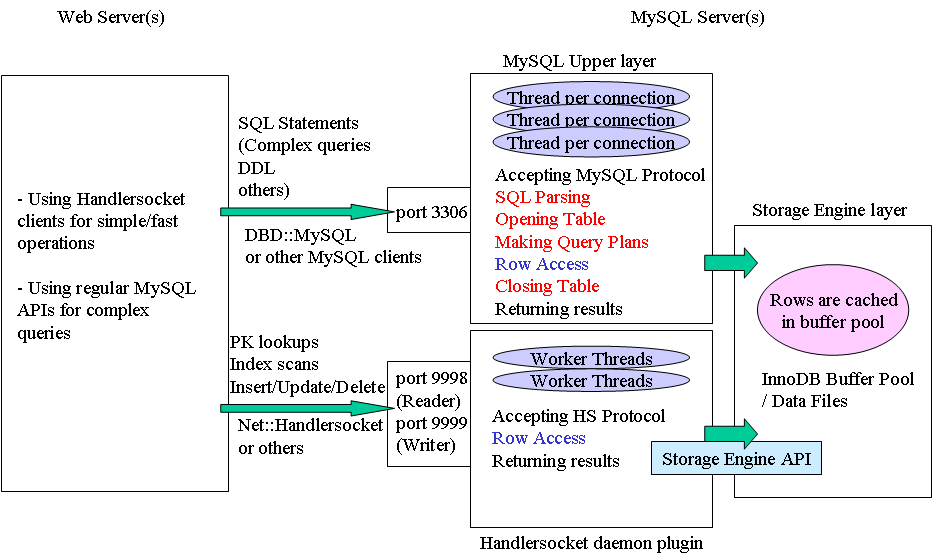
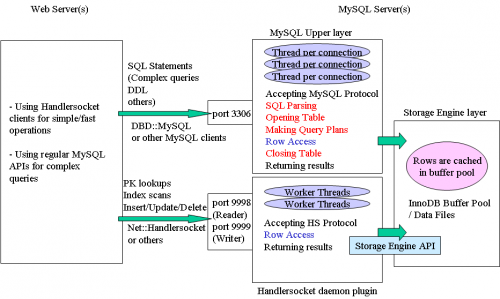
HandlerSocket provides a direct access to InnoDB storage, bypassing SQL interpretation layer. With in-RAM data, it may raise MySQL performance to 750000 queries per second.
Posted in Links, Software | No Comments »
25th January 2011
Posted in Links, Misc | 2 Comments »
27th October 2009
This query performs a table-wide search-and-repalce:
UPDATE `table_name` SET `table_field` = REPLACE(`table_field`,’string to search for and replace’,'replacement string’);
If you need a database-wide search-and-replace, you could try this script (I haven’t tested/used it myself).
Beware of the following gotchas:
- wrong query syntax may ruin the field you are performing replace on, so always backup first!
- be sure to provide “search-for” string as specific as possible, or you will get unexpected replacements (e.g. replacing mini with little will also convert all minivans into littlevans); also, do use WHERE clause when necessary to limit the number of rows modified
- the function in the example is case-sensitive, so replacing all minivans with vehicles won’t replace Minivans. However, I believe there exists a case-insensitive version of REPLACE function
Posted in how-to, Notepad | No Comments »
25th December 2008
Source: George from vbulletin team.
Two most common reasons (and fixes) for the MySQL server has gone away (error 2006) are:
- Server timed out and closed the connection. How to fix: check that wait_timeout variable in your mysqld’s my.cnf configuration file is large enough. On Debian: sudo nano /etc/mysql/my.cnf, set wait_timeout = 600 seconds (you can tweak/decrease this value when error 2006 is gone), then sudo /etc/init.d/mysql restart. I didn’t check, but the maximal value for wait_timeout might be around 28800 seconds (8 hours).
- Server dropped an incorrect or too large packet. If mysqld gets a packet that is too large or incorrect, it assumes that something has gone wrong with the client and closes the connection. You can increase the maximal packet size limit by increasing the value of max_allowed_packet in my.cnf file. On Debian: sudo nano /etc/mysql/my.cnf, set max_allowed_packet = 64M (you can tweak/decrease this value when error 2006 is gone), then sudo /etc/init.d/mysql restart.
If you get MySQL server has gone away (error 2006) when using MySQL ODBC driver – give this hint a try.
Posted in *nix, how-to, Software | 54 Comments »
26th March 2008
Must have been some maintenance, as I didn’t notice any changes in PHP/MySQL versions since the 7th of March.
Update: it seems as though since that short MySQL outage everything is faster at GoDaddy shared hosting. Did they upgrade database server(s)? I have no idea, but I like the change.
Posted in Misc | 1 Comment »
6th March 2008
Juicy presentation, even for seasoned MySQL developers.
Read the rest of this entry »
Posted in Links, Programming, Web | No Comments »
8th February 2008
Most frequent use: convert database from latin1_swedish to utf8_general_ci.
Original script found at: MySQL and UTF-8.
Update: the original script had an error, it would generate queries likes this one (note the bold part):
ALTER TABLE `links` CHANGE `link_rel` `link_rel` varchar(255) CHARACTER SET utf8 COLLATE utf8_general_ci NOT NULL DEFAULT NULL;
This is clearly wrong syntax (and logic). I fixed this by making comparison to NULL strict (with three equal signs instead of two):
// Does the field default to null, a string, or nothing?
if ($row['Default'] === NULL)
Update 2: based on comment by banesto, I modified the script; now it does not require specifying the from_collation, it’s sufficient to specify to_collation (which will be used for all the fields and tables). The modified code is:
if ($row['Collation'] == ” || $row['Collation'] == $convert_to)
continue;
Update 3: the long-lasting, re-appearing NOT NULL DEFAULT NULL problem is finally fixed.
Update 4: incorporated Russ’s fix to skip numeric fields (in order to leave autoincrement values intact).
Here’s the script itself: (to copy-paste: first click the “Plain text” header)
Read the rest of this entry »
Posted in Links, Notepad, PHP, Programming, Web | 60 Comments »