13th July 2009
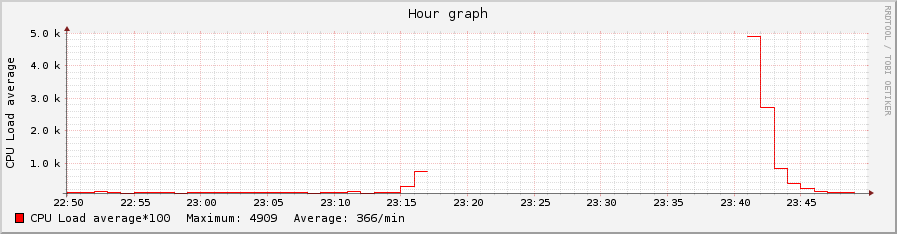
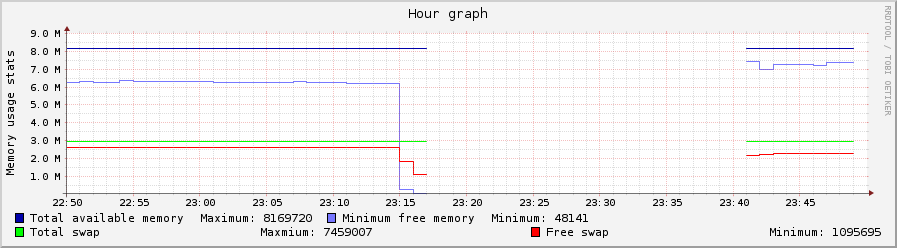
The two graphs below (clickable) are for CPU and RAM use during a period of a program going wild between 23:17 and 23:41 (24+ minutes of server’s downtime). The program was run non-root, it just consumed all the memory it could. It was killed by kernel, so the server started responding without any interventions – which were hard to perform, because none of the services (including ssh) were responding during downtime.
If you happen to be developing a C/C++ program – do use mtrace and valgrind, those are huge helpers against the problems akin to that shown on the graphs.
Posted in *nix, Programming, Software | No Comments »
6th September 2006
If you fetch large amounts of data (e.g. over 2MB per request) using HTTP_Client (or HTTP_request), you may get “out of memory” fatal errors, especially if:
- memory_limit is set to default 8M, and
- you process multiple pages using single non-reset instance of HTTP_Client object.
This problem can manifest itself by producing fatal error after a couple of cycles of successful page retrieval – but always, if run with the same parameters, after some constant or only slightly variable number of cycles.
In my case the problem was that HTTP_Request (a dependancy of HTTP_Client) was holding in memory all the previously fetched pages of the current session (the ‘history’ feature). To force HTTP_Request to hold only the most recent page, you need to ‘disable’ history after creating the HTTP_Client or HTTP_Request object instance:
$req = &new HTTP_Client($params, $headers);
// disable history to save memory
$req->enableHistory(false);
Hope this helps you.
Posted in Bioinformatics, how-to, PHP, Programming, Science | No Comments »