29th August 2017
On paper, these two devices are very similar: both have 4GB RAM, both are upgradable to Android 7, both have octacore CPUs.
It seems as if the only differences are:
- camera: Honor has an extra low-res “depth” camera, while Lenovo doesn’t
- frame/body: Lenovo has a metal unibody design and performed ok in the scratch/burn/bend test, while Honor has a plastic body, easy to scratch screen, and did not perform as good as Lenovo in the test
- Lenovo has a bigger battery
For about the same price (Lenovo P2 being a bit more expensive) one can buy a 4GB/32GB Lenovo P2 or a 4GB/64GB Honor 6X.
After using both phones for a while, I feel that Honor is a much better value overall.
Here’s a brief comparison, based on my use.
Read the rest of this entry »
Posted in Comparison, Hardware | No Comments »
18th May 2016
Prices were collected on May 18th, 2016, from amazon.de
Price per terabyte of WD Red HDDs
Capacity, TB | Price, EUR | EUR/TB |
|---|
| 6 | 252 | 42 |
| 5 | 208 | 41.6 |
| 4 | 158 | 39.5 |
| 3 | 116 | 38.(6) |
Posted in Comparison, Hardware | No Comments »
26th July 2015
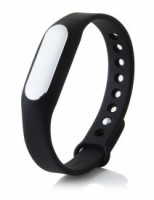 A few days ago, my Mi Band (version 1) stopped properly tracking sleep and counting steps. Here is a full list of symptoms:
- synchronization appears to work correctly;
- total count of steps is updated, but when you click it – there are no per-hour details;
- in the older app version: after sync completes, there is no green message “Updated X items”;
- night sleep tracker does not update at all: neither total hours slept, nor per-hour details;
- the band is otherwise functional, e.g. “Find the band” works – it vibrates and flashes diodes.
Warangelo00 found a solution, which worked for me (and no, you do not need to hard reset the device):
note: the fix below will most probably not work for Mi Band 2, see comments; iPhone owners may try switching iPhone from AM/PM (12-hour clock) to 24-hour clock to fix the non-synchronization problems with MiBand2 – please write in the comments if this method works for you.
- enable Bluetooth, if it is disabled;
- start Mi Fit, go to Play –> Incoming call (or, in older app version, Settings – Incoming calls);
- enable it – set to On;
- now call your mobile phone from a different one – wait for the band to vibrate and flash lights;
- you should now be able to refresh Mi Fit main page, and see both current day and previous night per-hour details; in the older app version, it should also show the green “Updated X items” message after syncing;
- you can now disable incoming calls notification if you don’t need it.
According to Holly, the trick may also work for Mi Pulse.
Not sure if this fix will last, but it did help me – thanks, Warangelo00!
Posted in Hardware, how-to | 51 Comments »
14th May 2015

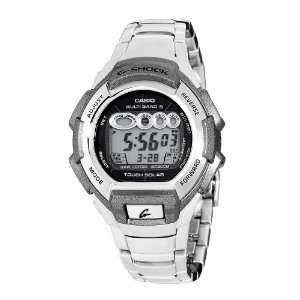
Casio G-Shock
In May 2010 I’ve paid US $118 for Casio G-Shock GW-810D (Atomic/Waveceptor Tough Solar) wrist watch with stainless steel band.
5 years later, at the end of April 2015, I lost it

.
Looking for a replacement, I found that:
- Casio seems to no longer make affordable models with the same functionality and a metal band – only polymer;
- a similar used model from Casio (MTG-something) costs upwards of 70 EUR.
I was quite sad about that. Any survivalist-minded person can easily see why:
Read the rest of this entry »
Posted in Hardware, Misc | No Comments »
10th April 2011
Quite a number of people are aware of the PAE which can extend the addressable space from 32bit up to 36-48-52bit (depending on the implementation; as I understand, Windows PAE extends to 36 bits, or 64GB of addressable space). However, overwhelming numbers of internet pages continue insisting that a not-more-than-4GB limit for the 32bit Windows is the consequence of 2^32 = 4GB architectural limit.
There is an excellent, in-depth, well-argumented article by Geoff Chappell on the issue. Highly recommended in its entirety to those who want a complete understanding (additional side-reading and facts verification might be necessary).
A single citation to get you started:
There is already on the Internet and elsewhere an awful lot of rubbish to read about this question. Hardly any of it would be worth citing even if I didn’t want to spare the authors the embarrassment. A surprising number of people who claim some sort of attention as expert commentators would have you believe that using more than 4GB of memory is mathematically impossible for any 32-bit operating system because 2 to the power of 32 is 4G and a 32-bit register can’t form an address above 4GB. If nothing else, these experts don’t know enough history: 2 to the 16 is only 64K and yet the wealth of Microsoft is founded on a 16-bit operating system that from its very first version was designed to use 640KB of RAM plus other memory in a physical address space of 1MB. Some remember this history and add seemingly plausible qualifications that exceeding 4GB is possible only at the price of nasty hacks that require everyone—well, all programmers—to jump through hoops. Fortunately, Intel’s processors are a lot more advanced than the 8086 from all those years ago.
P.S. Unfortunately, patching the kernel won’t help make Windows XP see more than 4GB RAM: even though the kernel itself does support more RAM (with PAE), starting with SP2 the HAL was modified in a way prohibiting access to any RAM beyond 4GB. Patching may only be suggested to devoted geeks with Vista’s and 7′s.
Posted in Hardware, Links, Misc, Software | No Comments »
19th June 2010
Will be useful to anyone dealing with more than 1 piece of computer hardware: Disk failures in the real world: What does an MTTF of 1,000,000 hours mean to you?
To get the essence quickly – just scan the tables and figures, and read conclusions.
You might want to read what google engineers tell about HDD failures.
Posted in Hardware, Links | No Comments »
2nd March 2009
I assume you already have configured and working desktop environment, but want to improve performance.
First of all, sudo aptitude install mesa-utils. Then run in a Terminal/Konsole glxgears, and wait for ~15 seconds; if your FPS is ~400 or less, then you do have sluggish video performance (usually manifesting itself as slow scrolling in Firefox/Iceweasel, slow window switching/minimziing/maximizing etc).
After reading through several forums and bug reports and blog posts, I’ve ended with the following modifications to my /etc/X11/xorg.conf:
Read the rest of this entry »
Posted in *nix, Hardware, how-to | 5 Comments »