27th September 2006
In Internet Explorer for Windows (tested with version 6 SP2), if you write CSS code similar to this:
CSS:
-
#floatbox
-
{
-
float: left;
-
width: 150px;
-
height: 150px;
-
margin-left: 100px;
-
}
and put your "floatbox" inside a container (such as DIV), you will actually see 200px of the left margin instead of the expected 100px. This problem is known as "IE margin-doubling bug".
In this post I collected solutions you can use to avoid this problem. The solution I'd recommend is at the end.
Read the rest of this entry »
Share This
Posted in Notepad, Programming, Web, XHTML/CSS | No Comments »
23rd September 2006
If you use AdSense, and want to make more visitors actually click on ads, you might consider using Google's "AdSense Section Targeting". It's really simple: you just have to put the text for which you want relevant ads displayed within a pair of HTML comment blocks (like < !--more-- > you might have used earlier). At the start of the text section you need ads for put this comment:
< !-- google_ad_section_start -- >
And at the end - this one:
< !-- google_ad_section_end -- >
If the text section(s) you marked this way are sufficiently long, and AdSense has relevant ads - they will be displayed.
You can also mark text sections which you would like to be ignored by AdSense. To do so, instead of the previously shown "start" comment block use this one:
< !-- google_ad_section_start(weight=ignore) -- >
Do not forget to close with the end tag!
Share This
Posted in Notepad | No Comments »
16th September 2006
I stumbled upon a good tiny widget which allows to "rotate" chunks of HTML code in your sidebar (using wordpress widgets plugin).
You may set up a couple of this rotators for different content types (e.g., text links, banners, google ads), and within each block put a number of alternatives, separated with a standard < --!more-- > tag (with no spaces, of course). Now each time when your page is shown, each instance of AdRotator will show one of the alternatives you put into it. Pretty simple and useful!
Share This
Posted in Notepad, WordPress PlugIns | No Comments »
16th September 2006
Mean is just a mathematical average of all the data point values; median is the value, which divides the continuum of data point values into two equal parts: values of the "left" part are all smaller than the median, values of the "right" part are all bigger than the median. Comparing mean and median, they usually say that
- mean is optimal for standard deviation calculation in the sense that it is the only measure of data points range, when standard deviation is the smallest possible;
- median is much less sensitive to the extreme values (outliers), which often are the result of error, and thus presents a more fair idea about the data set.
Here's a popular comparison example for mean and median:
Suppose 19 paupers and one billionaire are in a room. Everyone removes all money from their pockets and puts it on a table. Each pauper puts $5 on the table; the billionaire puts $1 billion (that is, $109) there. The total is then $1,000,000,095. If that money is divided equally among the 20 persons, each gets $50,000,004.75. That amount is the mean (or "average") amount of money that the 20 persons brought into the room. But the median amount is $5, since one may divide the group into two groups of 10 persons each, and say that everyone in the first group brought in no more than $5, and each person in the second group brought in no less than $5. In a sense, the median is the amount that the typical person brought in. By contrast, the mean (or "average") is not at all typical, since no one present—pauper or billionaire—brought in an amount approximating $50,000,004.75.
More can be found here and here.
Share This
Posted in Notepad | No Comments »
16th September 2006
LinkedIn recommends downloading their JobsInsider bar for IE (Internet Explorer) and FF (FireFox). I was surprised looking at the sizes of download files:
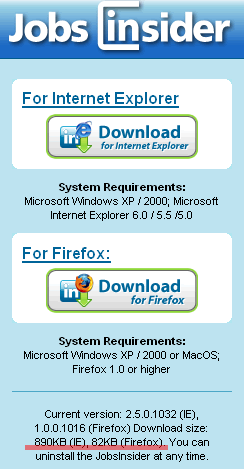
Well, FF fans might be proud once again
P.S. I strongly suspect, however, that size difference is due to the difference in functionality - note version difference between the two. I didn't try myself, though. If you try - please comment on what you found.
Share This
Posted in Notepad | No Comments »
15th September 2006
I had a need to kill a couple of TCP connections in Windows XP, and was looking for a small utility to do that. And I found CurrPorts. Here is the description, completely taken from the original site (all copyrights belong to the author, of course).
CurrPorts displays the list of all currently opened TCP/IP and UDP ports on your local computer. For each port in the list, information about the process that opened the port is also displayed, including the process name, full path of the process, version information of the process (product name, file description, and so on), the time that the process was created, and the user that created it.
In addition, CurrPorts allows you to close unwanted TCP connections, kill the process that opened the ports, and save the TCP/UDP ports information to HTML file, XML file, or to tab-delimited text file.
CurrPorts also automatically marks with pink color suspicious TCP/UDP ports owned by unidentified applications (Applications without version information and icons).
This utility works perfectly under Windows NT, Windows 2000, and Windows XP. If you want to use this utility on Windows NT, you should install psapi.dll in your system32 directory.
You can also use this utility on previous versions of Windows (Windows 98/ME), but in these versions of Windows, the process information for each port won't be displayed.
Share This
Posted in Notepad | No Comments »
15th September 2006
This is a small widgets-enabled plugin which allows to show your posts in the sidebar. For each instance of Sideblog, you select the category to display in it, the number of posts, and whether to exclude this categorie's posts from your feeds. After that just go to Presentation->Sidebar Widgets, and drag-and-drop Sideblog to the position you want.
Plugin can be found here (and here), or you can just download it.
P.S. Initially I found this plugin description here (uk).
Share This
Posted in Notepad, WordPress PlugIns | No Comments »
15th September 2006
Probably you already know and use it - but I started using it just today.
As expected, this plugin is amazing!
It's main concept is to allow WordPress administrator to use GUI in the admin panel to place new plugins in the arbitrary locations in sidebars (and not only sidebars, but that requires a bit more work), so you don't have to modify your sidebar.php with each new plugin installed.
The actual power of Sidebar Widgets (aka WordPress widgets) is not restrained by the sidebar - the "readme" file of the plugin distribution archive provides hints and ideas on how this plugin could be used. I suspect that Widgets might become the base for the further development of many other plugins and WordPress core as well.
So hurry to the WordPress Widgets homepage, grab one, and install as usual. You might need to modify your theme, if it doesn't support Widgets, but this process is well documented in the "readme" and should be fast and easy to complete.
You will surely enjoy this new experience, if you hadn't yet!
Share This
Posted in Notepad, WordPress PlugIns | 3 Comments »
14th September 2006
I am doing some simple statistics now, and had to review some basic concepts like standard deviation.
As a note to myself and anyone interested, here it stays.
The mean is just a sum of all your numerical observations, divided by the number of observations. E.g., if you have measured how tall your 5 children are, and got the values 1.42, 1.56, 1.05, 1.89, 1.92, the "mean height" of your children will be x = (1.42 + 1.56 + 1.05 + 1.89 + 1.92) / 5, x = 7.84 / 5 = 1.568 (all values in metres).
The mean itself doesn't tell you much, however. If you had this 1.568 mean available, you wouldn't know even the range of heights.
The standard deviation helps with this. First of all, it is measured in the same units as initial data - i.e. metres in our example. Second, it gives you an idea of how strongly do the measured values differ in your sample - the bigger the deviation, the longer is the value range measured in the sample.
Read the rest of this entry »
Share This
Posted in Science | No Comments »
13th September 2006
Sitting late in the night in front of my PC, and doing something boring, I stumbled upon the albinoblacksheep website. The two things I read were Cyber Sex (with a kind of follow-up) and probably old but anyway funny Automation: A Way of the Past - I liked that, so here're the links
.
And if you're Star Wars fan - you MUST watch ASCII Star Wars, for the Force to stay with you
I didn't read anything else there, but looks like a funny resource.
Hope you will enjoy 
Share This
Posted in Notepad, Web | No Comments »
13th September 2006
As I previously mentioned, in converting PFM to PWM single variable - [prior] background nucleotide frequency - was ambiguous to me. From other articles I noticed that it is usually set to 0.25 (1/4 - because there 4 nucleotides, thus in "perfectly random" sequence they would appear in 25% of cases each). In that post, I also thought of using "real" background frequency of nucleotides, calculated from the sequence, to which the matrix is to be applied.
I wrote a program to search all the 1000-basepair upstream sequences from all human, rat and mouse genes, present in Ensembl database release 40 (assuming those 1kb upstreams to be "promoters" of genes). For each promoter, only the single best score was returned. Then I draw a graph of the distribution of the number of promoters (y-axis) depending on the best match scores (x-axis). I did the search twice - one with p(b) = 0.25, and one with p(b) set to calculated values of A/C/G/T content in each promoter.
Read the rest of this entry »
Share This
Posted in Bioinformatics | 1 Comment »
11th September 2006
In the course of my current research, I was dealing with the TFBS (Transcription Factor Binding Sites) search. To perfrom the search, one needs position weight matrix (PWM) for each TFBS. When you refer to the TRANSFAC database of transcription factors (and matrices), you will get position frequency matrix (PFM), and will need to convert PFM into PWM.
I did find a couple of conversion formulas, but that was quite an effort to figure out which one is correct - I had seen two different formula variations. Here I will share what I had found.
Read the rest of this entry »
Share This
Posted in Bioinformatics | 11 Comments »
8th September 2006
Last updated: February 19, 2008.
The newest script version migrates from PHP-Nuke 6.5 to Drupal 5.x.
Download the latest version of the migration script.
In 2002 I set up a PHPNuke-6.0 - based portal. Eventually it died due to the lack of time investments and support from collaborators. Now, when time came to revive the project, I made a search and decided to use Drupal as a base CMS for the portal.
In order to migrate userbase from an old portal to the new Drupal-powered one, and following the topic at drupal.org, I found a script and its modification.
I used it to migrate only users, and made some cosmetic changes:
- added options for custom phpnuke table prefixes
- default user name is now = uname (login), not 'temp_name', as before
- I replaced hard-coded links to 'migrate.php' with links to $_SERVER['PHP_SELF'], so that if you rename the script you don't have any problems with that
- now forum topics should not be promoted to the main page (changed 1 to 0 as hinted by Alexis)
Finally, I would like to thank both Karthik Kumar for the original script and Alexis Bellido for the 6.0_to_4.7 modification.
Read the rest of this entry »
Share This
Posted in CMS, Drupal, PHP, Programming, Web | 63 Comments »
6th September 2006
Sometimes, writing automatic HTML forms processors, you need to post several values with the same name of the form field, e.g.:
collection_gene = str_chrom_name
collection_gene = gene_stable_id
This is against the RFC on form fields design and submitting, but this approach is used - for example, by Ensembl. I spent some time to figure out how to make HTTP_Client and HTTP_Request submit multiple 'name-value' pairs instead of one (the latest defined, which overrides the previous). The solution is extremely simple:
Read the rest of this entry »
Share This
Posted in Bioinformatics, PHP, Programming, Science | No Comments »
6th September 2006
If you fetch large amounts of data (e.g. over 2MB per request) using HTTP_Client (or HTTP_request), you may get "out of memory" fatal errors, especially if:
- memory_limit is set to default 8M, and
- you process multiple pages using single non-reset instance of HTTP_Client object.
This problem can manifest itself by producing fatal error after a couple of cycles of successful page retrieval - but always, if run with the same parameters, after some constant or only slightly variable number of cycles.
In my case the problem was that HTTP_Request (a dependancy of HTTP_Client) was holding in memory all the previously fetched pages of the current session (the 'history' feature). To force HTTP_Request to hold only the most recent page, you need to 'disable' history after creating the HTTP_Client or HTTP_Request object instance:
PHP:
-
$req = &new HTTP_Client($params, $headers);
-
// disable history to save memory
-
$req->enableHistory(false);
Hope this helps you.
Share This
Posted in Bioinformatics, PHP, Programming, Science | No Comments »
6th September 2006
If you happen to write PHP script, which uses either HTTP_Client or its dependancy HTTP_Request from PEAR, and the script is supposed to work through the HTTP proxy - here are the sample settings you need:
PHP:
-
$params['proxy_user'] = 'proxy_username';
-
$params['proxy_pass'] = 'proxy_password';
-
$params['proxy_host'] = 'proxy_hostname_or_ip';
-
$params['proxy_port'] = 8080; // 3128, ...
-
-
// I assume $headers were set somewhere else
-
$req = &new HTTP_Client($params, $headers);
If your proxy does not need authorization - just drop the proxy_user and proxy_pass parameters.
Share This
Posted in PHP, Programming | 1 Comment »
4th September 2006
This plugin is expected to increase the coverage of your blog by Google. You will have to register for the google sitemaps tool (which is free), that will be easy if you gmail account. In short, sitemaps let google know which pages your blog/website has, so that it can crawl everything (read more).
This plugin automatically generates blog sitemap each time you create/update a post or a page. This is a must-have plugin, especially if you're crazy about SEO 
Share This
Posted in Notepad, WordPress PlugIns | No Comments »
1st September 2006
Topologilinux 'BSOD at launch' problem solution is at the end of this post.
Topologilinux is a special linux flavour, which is especially fit for the newcomers to the *nix world. The motto of Topologilunux is 'Running Linux inside Windows' - and that is what it does. Even more - you can run it inside windows, or you can boot into it and work Linux-only - in both cases the system is the same.
Personally, I consider this kind of setup extremely useful for users who are strongly used to working in Windows (or just stuck with windows for too long), but at the same time are inclined to script a bit (be it bash, Perl, PHP or Python), to run server applications, write cross-platform programs, to test something or just play with software. With Topologilunux, it's perfectly fine to work in DreamWeaver on your windows machine, and launch Topologilinux with apache+php+mysql to serve as a testing server - on that same machine. You can easily replicate the needed server config, and play with it the way you wouldn't if that was the production server.
Read the rest of this entry »
Share This
Posted in OS | 1 Comment »
